Alert: VidyoConnect for iPadOS 26 and later—September 8, 2026
Which products are affected?
- VidyoConnect for iPad
How are users impacted?
Users of VidyoConnect for iPad will see an error saying ‘Camera is not available’ if all of the following are true:
- The iPad has ‘Windowed Mode’ enabled under ‘Multitasking and Gestures’.
- You can read more about this on Apple’s website here.
- The VidyoConnect application is also running windowed, as opposed to full screen.
If the above conditions are true, the resulting behaviors will follow:
- Users will not be able to see their self-view.
- Other members in the meeting will not be able to see the impacted user’s video feed.
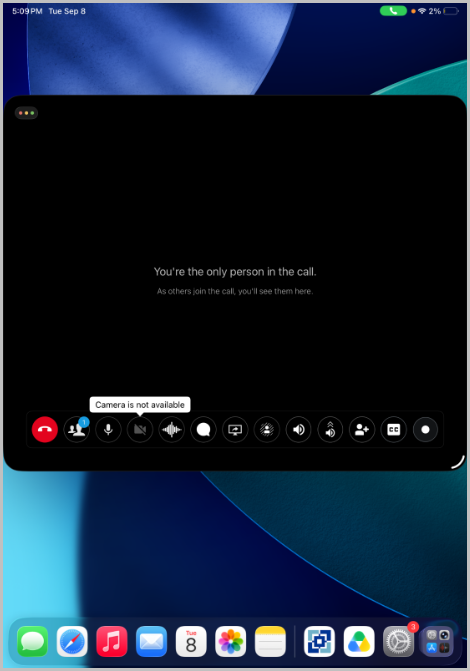
Understanding the issue
iPadOS introduced a new modality to iPads where applications can run in 'Windowed Mode' akin to macOS. You can read more about it on Apple’s website here.
Owing to the way we access the iPad’s camera in a restricted fashion, our app loses access to the camera if it is running in a window. This causes the user to see the error.
What can users/admins do in the meantime?
- Run VidyoConnect in 'Full Screen' mode.
- To do this, tap the green button in the top left area of the window.
- You can read more about it on Apple’s website here.
- Keep ‘Windowed Mode’ disabled in 'Multitasking and Gestures'.
- Settings > Multitasking and Gestures > Select ‘Full Screen Apps’.
What's Vidyo doing about it?
- We have prioritized the fix for the next outgoing version of VidyoConnect for Mobile.
Need help?
If you still need help you can contact your Vidyo Reseller or the Vidyo Support Team via the Contact Us support page.