Version 26.1.0 (Android and iOS)—March 2026
- Kiosk functionality with Restricted Access Mode
- VidyoConnect Mobile now has a Kiosk Mode with advanced restricted-access controls.
- This feature lets you put the iPad into a restricted mode to prevent tampering in high traffic or secure areas.
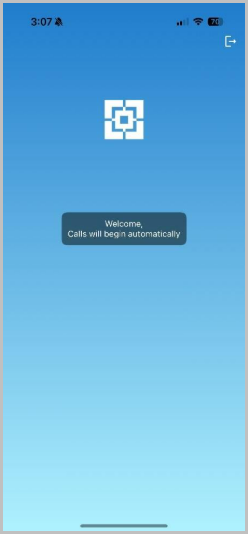
- The restricted mode is configurable via Mobile Device Management (MDM) parameters for iOS devices.
- The restricted mode can also be password locked so only authorized personnel can access the full app.
- The restricted mode automatically keeps the app logged in for extended periods beyond the day restriction regular VidyoConnect mobile endpoints enforce as a security requirement.
- We control this requirement by using a more advanced user type called Executive on our mobile endpoints. This is the same user type that is currently used to power VidyoRoom SE and VidyoRoom endpoints.
- The restricted mode also keeps the screen turned on indefinitely. This supersedes the device screen timeout to ensure your kiosks are running 24/7. You can find these settings under Preferences.
- This mode also allows admins to hide the call decline button on incoming calls. This powerful feature allows you to use VidyoConnect Mobile as a lightweight kiosk on wheels for quick, easy conferencing needs.
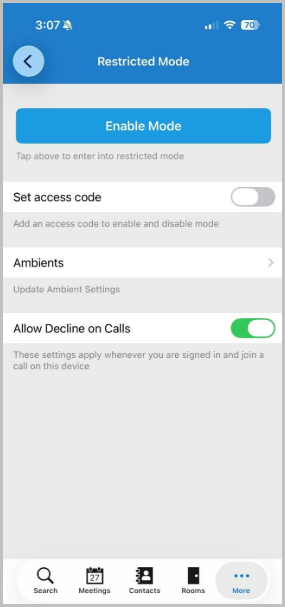
- To learn more about the Kiosk Mode with Restricted Access and how to deploy it across your organization, please read more about our feature here.
- MDM parameters to suppress Moderation Wizard
- A new parameter has been added to allow organizations to suppress the moderation wizard across their enterprise deployments.
- This new parameter is a Boolean variable: disableModerationWizard. Setting this variable to a value of 1 will disable the moderation wizard on the managed devices throughout your organization.
- MDM parameters for configuring Portal URL
- The VidyoConnect for iOS app now supports configuring the Portal URL in isolation via MDM.
- Previously this MDM configuration existed as a combination of the URL, the username, and the password.
- Improved UX for network outage at login
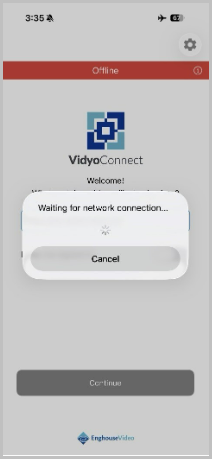
- The app will now continually check for network availability if network loss happens during login. If the network is restored, the app will login automatically.
- Speakerphone selection setting
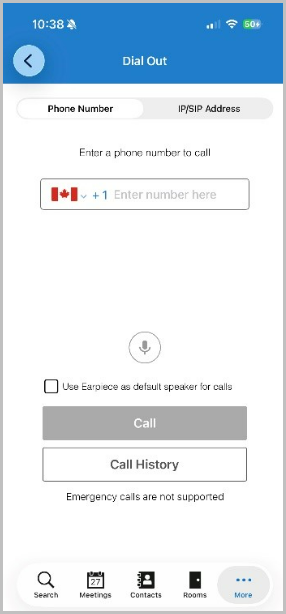
- There is now a new setting in our dial out menu that allows users to select the earpiece as a default speaker for outbound calls.
- This setting is persistent across calls. For example, the app will remember the user’s previously selected choice before starting a new call.
Resolved issues
There are no resolved issues in this release.
Known issues
There are no new known issues in this release.